Personal Website
The site you're on
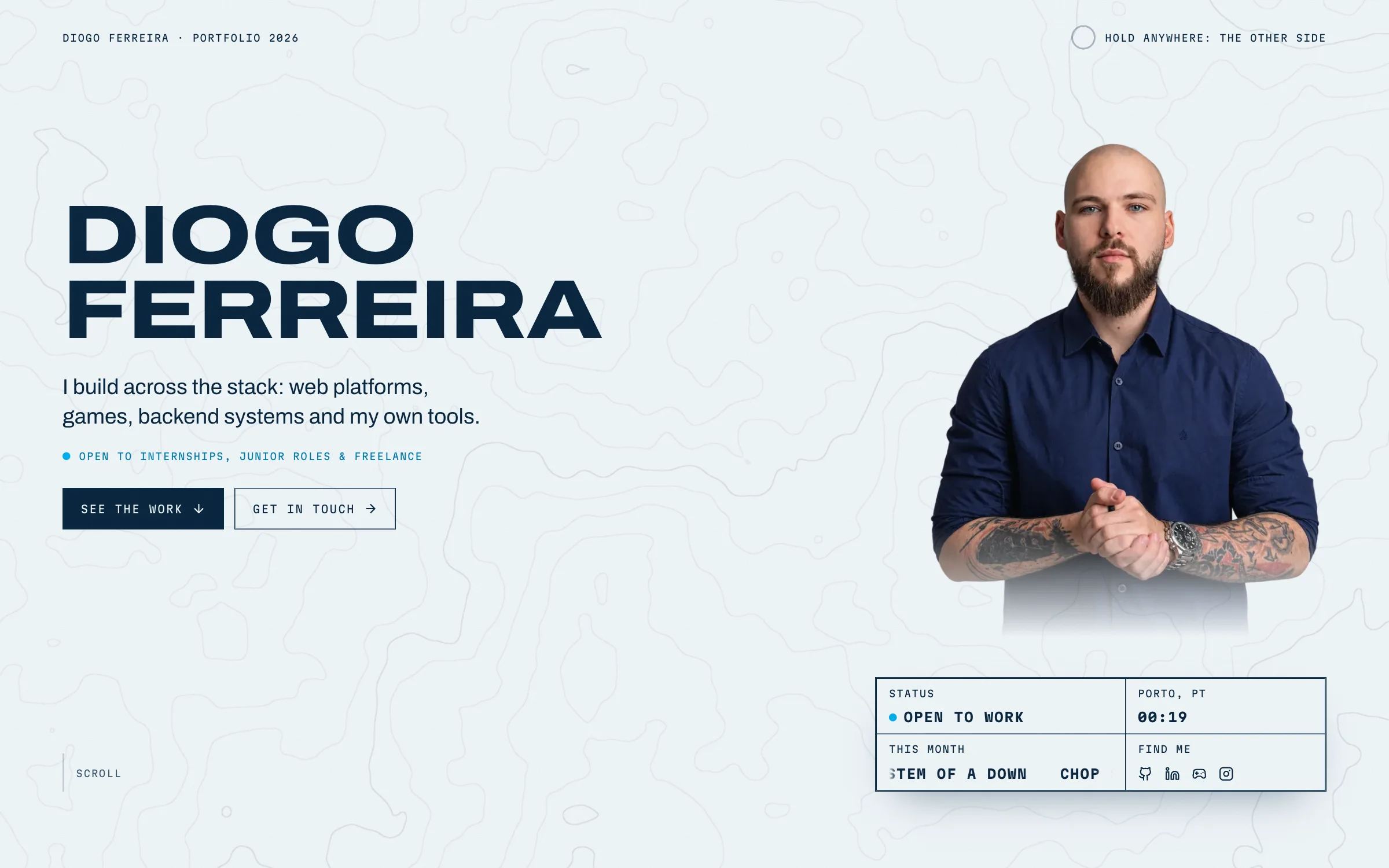
A custom-designed personal portfolio built with Next.js, WebGL and GSAP.
- Year
- 2026
- Kind
- Web
- Role
- Solo: design, code and content
- Stack
- Next.js Framework
- React Client
- GSAP Library
- WebGL API
Starting over
This is the second version of my site. I made the first in March 2026 with Next.js, Tailwind and a shadcn theme. It had Spotify and Steam on an about page, a terminal and a like counter, and it worked, but it looked like a lot of other sites.
In October I started over. I kept the content, the live data and the terminal idea, and rewrote everything else.
Ten prototypes
Before writing any real code, I did a lot of research. I went through various websites that I liked, worked out what made them work and what didn't, and learned the tools I'd need, like GSAP and writing my own shaders.
Then I picked a direction and built ten rough prototypes of it. The direction is a cyanotype, the old blueprint process: deep blue, paper white, and cyan as the light. Project pictures start as blue prints and develop into colour, the page changes colour as you move through the sections, and holding anywhere floods the screen in blue and takes you to the personal side, Off the clock.
The second prototype became the site, and most of the others gave it one piece: the exploded stack on these project pages, the ink in water in the side panel, the desktop behind the terminal.
How it's built
It's Next.js with the App Router, in plain JavaScript, with one CSS Module per component. GSAP runs the motion: ScrollTrigger for anything tied to scrolling, SplitText for the titles, Flip for the archive's filters. Lenis smooths the scroll, and it's off for anyone who asks their system for reduced motion.
The WebGL is written by hand, without a library. The contour lines in the background, the ink that bleeds over a print on hover, the pictures melting into each other in the archive, the fluid in the side panel, the record on Off the clock and the shapes in the toolbox are all small fragment shaders, and every one of them stops drawing when its canvas is off screen.
The live parts (what I'm listening to and playing, the manga I'm reading, my latest commit, my next exam, Porto's weather) are fetched on the server and cached. If one of them fails, the page shows a fallback instead of an error. The site is in English and European Portuguese, from one JSON file per language, and the contact form is a server action that sends the email through Resend, with rate limits on everything that costs a request.
- 01Next.js Framework
The pages in two languages, rendered and cached on the server, plus the API routes and the contact form.
- 02React Client
Every section is a component; the motion, the canvases and the terminal run in the browser.
- 03GSAP Library
All the motion: scroll-linked animation, pinned sections, the title reveals and the archive's filters.
- 04WebGL API
The hand-written shaders: contour lines, ink, the melt, the fluid, the record, the toolbox shapes and the Porto map.
The terminal
Press Cmd+K (or Ctrl+K) on any page and it turns into a desktop like a Linux tiling window manager: a shell, fastfetch, my Steam library, my top artists and a file browser with every project, with Alt+h/j/k/l to move between windows. The second workspace has the guitar tab open in Neovim. It plays. The shell keeps the old site's commands and has eight games, among them snake, minesweeper, 2048 and a hangman with 251 One Piece words.
What testing found
The first time I opened it on my iPhone, every dark section was washed out to a pale cyan. On my computer it looked fine, even in Safari's engine. The cause was the canvas that draws the contour lines, which covers the whole page. Between the lines, it drew the line colour at zero opacity. Every other browser treated that as invisible, but Safari on the iPhone still added the colour, so the pale cyan spread over everything. Now the canvases store each colour already multiplied by its opacity (premultiplied alpha), so zero opacity means no colour at all. That fix turned the project pictures black in Safari, so the one canvas that draws the ink still works the old way.
Going through every page with only the keyboard found a worse one: on a computer, Tab couldn't reach anything after the toolbox. The animations that reveal things as you scroll hid them in a way that also put them out of Tab's reach, so now they only fade them in. The guitar tab alone was over 60 Tab stops; now it's one, and the arrow keys move between notes. Lighthouse gives accessibility 100 on every page except home, where the faint words in the statement are faint on purpose.